In order to get started in Refined Storage you need a few basic things to get things going. Although the mod can be used for loads of automation and advanced features; without starting at the beginning, none of this is achievable, and even if you hesitate to proceed into the deeper features of the mod, the idea of a unified storage for all of your items can streamline the game significantly, especially in a modpack which increases the diversity of items significantly.
Below is a list of vanilla items you'll need to aquire in order to make the most basic refined storage system with 1000 item storage. It would be fair to say that most veterans start with the 4k or 16k storage options, but considering how much easier it gets to build and add storage once you have your items consolidated into a refined storage system, this is a good start.
Vanilla Items Required
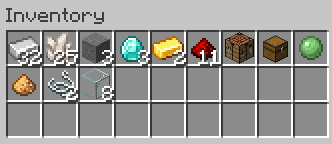
Iron Ingot 32
Quartz 25
Stone 3
Diamond 3
Gold 2
Redstone Dust 11
Crafting Table 1
Chest 1
Slimeball 1
Glowstone Dust 1
String 2
Glass 8
And to be clear, the crafting table is an ingredient in the storage setup, this is an example inventory for what you'll need to actually put together the system:
I included 4 furnaces because waiting on just one can be very tedious. Also, do not worry about the first two items in my inventory, the pickaxe is there for convenience but isn't necessary and the Stirling Dynamo is just there for some bare essential power generation to run the storage system. Honestly whatever crafting, smelting and power setup you have is probably all you need but in the interest of this guide being comprehensive I included the list of required tools.
I am assuming here that you have JEI installed so you have the recipies for each of these items, as most any modpack which includes Refined Storage would have it installed. I made the list here with checkboxes in front of it, they don't actually DO anything other than help you keep track of where you are in the list.
Smelt 14 Quartz (leaving 11 Quartz)
Make 40 Quartz Enriched Iron (leaving 1 Quartz)
Make 8 Processor Bindings (1 recipie)
Make + Smelt 3 Raw Advanced Processors
Make + Smelt 2 Raw Improved Processors
Make + Smelt 2 Raw Basic Processors
Make 3 Machine Casings
Make a Destruction Core
Make a Construction Core
Make a Controller
Make a Disk Drive
Make a Grid
Make a Crafting Grid
Make a 1k Storage Part
Make a 1k Storage Disk
Stack Parts as Shown
Right Click The Disk Drive (top block) and insert the 1k Storage Disk
After completing this list you'll have (I believe) one piece of Quartz Enriched Iron and one Processor Binding remaining, you should store them for any additional crafting you do in the future, but the main thing's you'll have will be the Controller, Disk Drive, Crafting Grid and 1k Storage Disk. The three block-like items need to be stacked in such a way that they are all touching on a face, layering them on top of eachother works fine. My suggestion is that you stack them as pictured above but any connected orientation works.
And then depending on your modpack, you will need to provide the system with some form of power. Shown here is a simple Stirling Dynamo from Thermal which uses coal to provide power. Power should be pumped into the controller block as shown here, or with pipes or cables, any connected Refined Storage blocks will recieve power automatically from the Controller. The more storage, importers, exporters, and other features you add, the greater the power requirement will be. For a basic system like this, with just one Storage Disk, it calls for 5RF/t, which is pretty easy to provide.
At this point you have a Refined Storage setup, if you are anything like me, you'll be a bit overwhelmed at the steps (though this guide hopefully means you had a much easier go of it than me, trying to watch a bunch of YouTubers fly through it and reading a bunch of half-baked wiki entries) if you wish to relax and enjoy, maybe add a few storage disks to your setup, good on you, but for a tiny bit of info on what you can do next to improve your storage setup, read on about what some of the next items in the mod can do.
If you wish to read on and learn more about what Refined Storage can do I have provided some information below, but be warned that this is more a vague explination of the capabilities of these other parts of the mod and is not a comprehensive guide on how to use them, it will serve to inform you of what the mod can do, and of what part of it you might want to explore next, but additional learning will be required to fully utilize these things.
Cables are an item that provide connection (and power) to other Refined Storage blocks, they can be used to do things like connecting another Crafting Grid (with access to the same storage of course) somewhere else, or putting several Storage Drives underground so you can increase your storage but keep most of it hidden. Cables are absolutely essential to use if you are going to start adding any of the next items.
Exporter / Importer these are two different connectors, but they are exact opposites of eachother so it seems reasonable to lump them together. These connectors can be right-clicked and they will present you with many options, an important thing to do is look up and create Speed Upgrades for them because they are painfully slow without them. What these do is Import and Export items from your Refined Storage System. It is super important to remember that exact wording An Importer, Imports items into your Refined Storage Network and An Exporter, Exports items from your Refined Storage Network it may seem a bit obtuse, but you'll thank me later because it is super easy to attatch an Exporter to an item because you want to export it's contents only to be confused when it does not work, the names are relative to the Storage Network, not to the item to which they are attatched.
Whitelist - might be obvious for some, but a whitelist is a list of things that are permitted. So if you choose Whitelist mode for an Importer or Exporter, you can then tell it which items to Import or Export from or to what it is connected to
Blacklist - sometimes you'll want an Importer or Exporter to move nearly every item they have access to, but not certain items, these situations are where a blacklist applies, you make a list of what items you Importer or Exporter should not move
External Storage is a type of connector that can be added to another storage type block in your Minecraft world to connect it to your Refined Storage network. So for example, if I put an External Storage attatchment onto a large chest, I would then be able to access all of its contents the same as if they were in my Disk Drive. Each sorter (like your Disk Drive) has a priority number that defaults to 0, the higher a priority number something is given, the more eagerly it will be filled, so you can make the chest less or more likely to be filled by modifying its priority number. External Storage is often a bit of a headache, I often use it to connect to something automated (like a mob farm, or automated crops) but set the storage priority of the items to a negative number. In this way, the items I dump in my storage never go into the chest, but I always have access to the proceeds of the farm. This may all seem like it is more trouble than it is worth, but there are two very distinct benefits to working this way:
If you were to want the proceeds of a mob farm connected to your Refined Storage network, this would be ideal, as letting the mob farm dump items into your storage constantly would eventually reach your storage limit. If your storage has access to a remote chest, you might accidentally move stuff from the chest into your storage manually, but the mob farm would then not be able to inadvertantly fill your storage network while you were innocently AFK.
If some of the things going into the External Storage chest are going to be sorted, voided, or otherwise processed, but some of it will be needed in the storage network, then connecting it as an External Storage instead of dumping it into your network might be expedient.
Connecting to Storage Drawers: Storage Drawers is a totally different mod, but it plays nicely with Refined Storage and once you get used to working with it you will find it can be very powerful, I won't go too deep into it right now, but Storage Drawers can not only expand your storage capacity dramatically, but can also provide some quality of life features like limiting how much of a certain item you will store or automatically making you different block variants instantly as you need them for crafting.
Constructor / Destructor these are also two different blocks that are the opposite of eachother, but they provide a very unique ability to place and break items in the world. Refined Storage isn't specifically built for automation, but there are great examples of things you can do with it, like placing a Destructor right in the middle where lava/water makes cobblestone and having the cobble automatically be harvested giving you an unlimited supply. You could also make a Constructor constantly pour Lava into the corner of a 2x2 infinite water source, then use a Destructor to harvest the resulting obsidian, and you would be able to save yourself mining it yourself as long as you have a good lava source. I am aware of what these blocks do, and I am sure they have marvelous potential, but I can honestly say I personally have never used them.
Interface this block is made by combining (among other things) an Importer and Exporter, but it has a bit more features than either, and also cannot do some things that the others can. It has three lines of item slots, one is for what the block Imports, one is for what the block Exports, and the third is the actual storage of the block itself. For example you could tell it to Export Cobblestone (say, to a Redstone Furnace) and Import Stone, you would put the corresponding blocks into the Import and Export slots, and it would then fill itself up with the items it needs and continue to make that transaction, importing any Stone that is placed into it (by you, or a machine) and exporting Cobblestone. This block is very useful for if you need to both add and remove items from a block but are also perhaps piping in fluids and power already, and have several of them side by side, so it would be nearly impossible to also attatch an importer and exporter. to the limited sides available on the machine.
Crafter information on what this block can do could fill a warehouse, and it also requires you make another Grid, and turn that one into a Pattern Grid. Essentially, you make items called Patterns, which are minecraft item recipies, and then you put them into a crafter that is connected to your storage, and then you can call upon your storage to craft that item. For example, if you had taught a bunch of crafters how to make Chests, Hoppers, and Planks, then if you needed a hopper and all you had in your system was a bunch of Oak Logs, you would always have a spot that showed Hoppers and Chests, but instead of showing a quantity they would just say "Craft" and when you clicked them you could request them. Refined Storage will try and build every component it can in this manner, and before it even starts it will tell you if it is missing ingredients (or simply does not know how to craft some of those ingredients). Crafters can also be attatched to machines and the Pattern Grid can make "Processing" recipies, so for example you could also attatch a crafter to a Furnace (and connect the Crafter to the system with a Cable, and put an Importer on the Furnace to collect the glass) and then use the Processing Grid to make a Pattern that says basically "Sand = Glass" and then whenever you need Glass your Refined Storage system will use that crafter to try dump Sand into the furnace. It will even wait patiently if the furnace is busy until such a time as it accepts the Sand, then the system will wait for Glass to show up.
Crafts can get clogged, broken, or just not complete properly. If you are going insane trying to find out why you've requested something 5 times and it never showed up, make a Crafting Monitor, it will show you the process on every recipie, usually it will come down to an item not being exported or accepted by a machine.
You might wonder why you'd have to include a Crafter to drop an item into a machine, AND an Importer to collect the item, it seems needlessly complex but has great benefits. Firstly, some machines don't export items on the same side they import items, secondly it allows you to automate much more complex crafting recipies and integrate with far more mods. If you needed to drop off an item into a chest, knowing that it would then be automatically piped or conveyored through several different machines and eventually the resulting product would be returned, then you could do exactly that. For example, you could drop off some Ore in a giant machine made in the Create mod, and then collect it from another chest after it is processed, allowing a very customized player made machine to integrate perfectly with a totally different mod.

 Smelt 14 Quartz (leaving 11 Quartz)
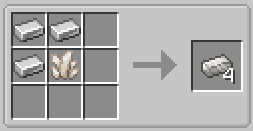 Make 40 Quartz Enriched Iron (leaving 1 Quartz)
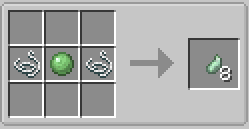 Make 8 Processor Bindings (1 recipie)
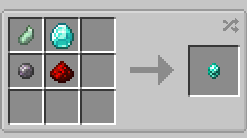 Make + Smelt 3 Raw Advanced Processors
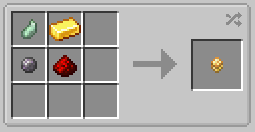 Make + Smelt 2 Raw Improved Processors
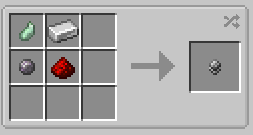 Make + Smelt 2 Raw Basic Processors
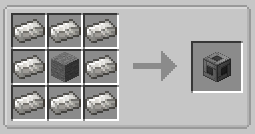 Make 3 Machine Casings
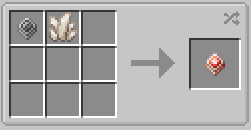 Make a Destruction Core
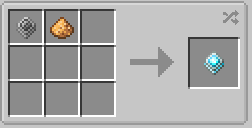 Make a Construction Core
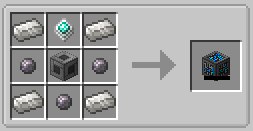 Make a Controller
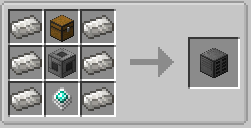 Make a Disk Drive
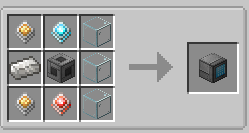 Make a Grid
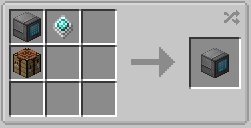 Make a Crafting Grid
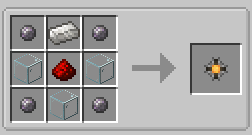 Make a 1k Storage Part
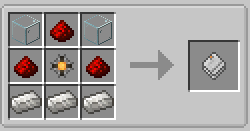 Make a 1k Storage Disk
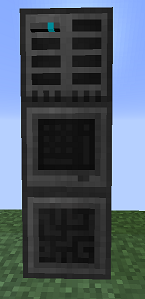 Stack Parts as Shown
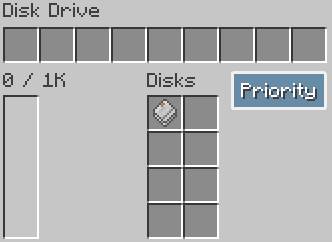 Right Click The Disk Drive (top block) and insert the 1k Storage Disk
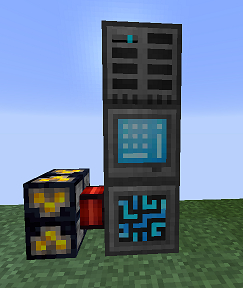 After completing this list you'll have (I believe) one piece of Quartz Enriched Iron and one Processor Binding remaining, you should store them for any additional crafting you do in the future, but the main thing's you'll have will be the Controller, Disk Drive, Crafting Grid and 1k Storage Disk. The three block-like items need to be stacked in such a way that they are all touching on a face, layering them on top of eachother works fine. My suggestion is that you stack them as pictured above but any connected orientation works.